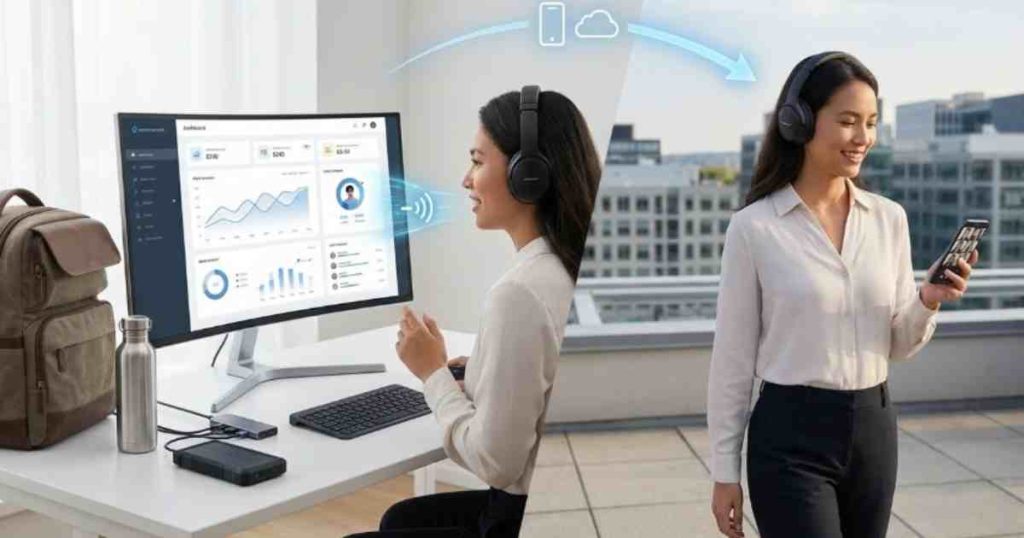
The “Office in a Backpack”: Managing Remote Teams with Mobile Cloud Ops
In the main article on scaling from startup to enterprise, we discussed how auto-scaling plans and room-to-grow architectures remove the friction of growth. One of the clearest examples of this scalability in action is global expansion—specifically, the ability to add local phone numbers in 50+ countries instantly, without infrastructure, contracts, or long lead times.
In this supporting article, we’ll explore how global number provisioning works, why it matters for fast-growing businesses, and how platforms like Maxlink Solutions enable international reach without operational complexity.
Why Remote Teams Need a Mobile-First Communication System
Managing a remote workforce can be challenging without the right infrastructure. Traditional office phone systems and on-premise servers require employees to be physically present. This creates communication gaps when teams work from home or across different locations.
Mobile cloud systems solve this by moving communication tools into the cloud. Instead of being tied to desk phones or office hardware, employees can access their work systems from mobile apps and web dashboards.
Platforms like the cloud solutions available on the Maxlink Solutions Home allow companies to manage calls, messages, and collaboration tools through a unified interface.
Key advantages include:
- Work communication accessible from any device
- Centralized management for distributed teams
- Seamless switching between mobile, desktop, and office devices
- Improved collaboration and productivity
In short, remote employees stay connected without needing to be in the same building.
The “Office in a Backpack” Concept
The phrase “office in a backpack” refers to having every essential communication tool available on a mobile device. Employees only need a smartphone and internet connection to operate as if they were in the office.
Cloud platforms combine multiple business communication tools into one ecosystem, including:
- Voice calls
- Team messaging
- SMS communication
- Video meetings
- Call routing and IVR
- CRM integrations
- Call monitoring and analytics
For example, a mobile-enabled Cloud PBX communication system allows employees to receive business calls directly through their phone or laptop without exposing their personal number.
This flexibility makes it easier for distributed teams to stay responsive to customers and coworkers.
Managing Calls from Anywhere with Mobile Cloud PBX
One of the most important elements of remote work is maintaining professional phone communication. Clients still expect quick responses, even if the team is working remotely.
A cloud-based phone system ensures business calls are never missed. With a mobile-friendly Cloud PBX solution, employees can:
- Make and receive calls from business numbers
- Transfer calls to teammates instantly
- Access voicemail and call logs remotely
- Route calls through automated systems
Companies can also integrate SIP connectivity through SIP Trunking services to connect cloud communications with existing telephony infrastructure.
This setup keeps operations professional even when the team is fully remote.
Real-Time Team Collaboration on the Go
Remote teams rely heavily on fast internal communication. Mobile cloud platforms enable collaboration tools that bring teams together even when they are geographically distributed.
For example, virtual receptionist systems and team messaging platforms make it easier to manage inbound communication and internal coordination. Businesses can implement features such as a digital front desk using the Receptionist collaboration tool.
Additionally, companies can assign regional or international phone access through Virtual Number services, allowing employees to serve customers in multiple markets without needing physical offices.
These tools keep distributed teams organized and responsive.
Mobile Messaging and Customer Communication
Voice calls are important, but modern business communication also relies heavily on messaging.
Mobile cloud systems allow teams to send and receive customer messages directly through centralized platforms. Using business SMS tools like SMS communication services, companies can:
- Send appointment reminders
- Deliver support updates
- Communicate with customers quickly
- Run notification campaigns
This is especially valuable for support teams and customer-facing departments working remotely.
For businesses that still rely on fax communication, digital solutions like E-Fax services allow documents to be sent and received electronically, eliminating the need for office hardware.
Managing Customer Support Teams Remotely
Customer service departments often struggle with remote operations because supervisors need visibility into team performance.
Cloud contact center platforms solve this by offering management dashboards and analytics tools accessible from anywhere.
A mobile-enabled Contact Center platform allows supervisors to:
- Monitor agent activity
- Track call performance metrics
- Listen to live or recorded calls
- Manage call queues and routing
Advanced CTI capabilities, such as those found in the Contact Center Supervisor tools, give managers real-time insight into team productivity.
Automated systems like the Interactive Voice Response (IVR) feature also ensure customers reach the correct department even when teams are distributed.
Broadcasting Messages to Distributed Teams
Large remote teams often need fast communication for announcements or updates.
Voice broadcasting tools can deliver recorded announcements to multiple employees simultaneously. With solutions such as Voice Broadcasting tools, managers can quickly send updates to the entire team.
This is useful for:
- Emergency notifications
- Schedule changes
- Company announcements
- Operational updates
It ensures everyone receives the same information at the same time, even if they are working from different locations.
Security and Reliability for Remote Work
When teams operate remotely, security becomes even more critical. Businesses need reliable infrastructure that protects communication channels and data.
Cloud communication platforms provide:
- Secure encrypted connections
- Redundant data centers for uptime
- Centralized user access control
- Automated system updates
Organizations can explore these advantages further through the solutions described on the Maxlink Solutions platform overview.
Reliable infrastructure ensures remote teams can work without interruptions.
Why Businesses Are Choosing Mobile Cloud Operations
Companies across industries are adopting mobile cloud communication because it improves both flexibility and operational efficiency.
Key benefits include:
- Reduced reliance on physical office infrastructure
- Lower communication costs
- Easier scaling for growing teams
- Better customer responsiveness
- Improved employee mobility
Businesses looking to implement these capabilities can explore available communication tools through the Maxlink services overview.
Organizations can also evaluate plans through the Maxlink pricing page to determine the best fit for their team size and operational needs.
Building the Future Remote Workforce
Remote work is no longer a temporary trend—it has become a long-term operational strategy for many businesses. Companies that embrace mobile cloud communication gain a significant advantage in flexibility, scalability, and productivity.
By creating an “office in a backpack,” organizations empower employees to stay connected, collaborate effectively, and support customers from anywhere in the world.
Businesses interested in implementing mobile cloud operations or expanding their communication infrastructure can explore partnership opportunities through the Maxlink partner program.
And when teams need assistance, the Maxlink Support Portal provides quick access to help and technical resources.